




Web Parts - SharePoint ShortUrl

SharePoint ShortUrl - Simple Sense - Play Demo
Unlimited Shortened Hyperlinks.
Date expiry for short lived Hyperlinks.
Hyperlink ownership for audit trails.
Very easy to use, no training required.
Very easy to install.
Tightly integrated with SharePoint.
Reduces Errors.
Improves productivity.
Allows vanity hyperlinks.
Users will love it.

View Quick Demo

SharePoint ShortUrl Purchase Information

Secure Payments with PayPal

Enterprise License

Standard License

Unlimited Users 50 Users
Unlimited Servers
in Organisation
(Multi Farm)
1 Server
£599 £299
Purchase ShortUrl Enterprise License Purchase ShortUrl Standard License
Once you decide to make purchase of the correct SharePoint ShortUrl License you will be taken to our secure Members Area. Signup as a Member to download your copy of SharePoint ShortUrl, we accept payments securely via PayPal.

If you require an Invoice to raise a Purchase Order, please Contact Us. Once payment is received we will send you the access details for the Members Area and your ShortUrl download.

Receive 1 year Free upgrades and email support with each License!

SharePoint ShortUrl Overview

  View Usage Demo View Install Demo
 
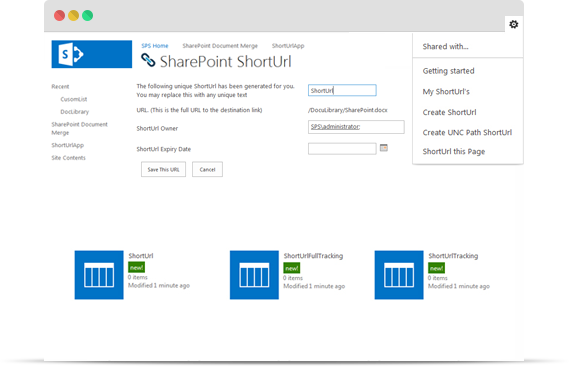
SharePoint ShortUrl allows the creation and use of vanity and shortcut hyperlinks. Too often and especially with large complex installations, the structure of a SharePoint site collection can lead to enormously long hyperlinks, which makes for ugly and error prone hyperlinks.
 
  ShortUrl Feature Activated - Site Actions

Create ShortUrl's to any Page, List, List Item, Document and View within SharePoint! Also to any external Url - including ftp and mailto.
 
ShortUrl Feature Activated - List Item Menu

For example, compare the following hyperlink to a folder in a document library: https://yoursite/clients/abc%20company/Shared%20Documents/Forms/AllItems.a spx?RootFolder=%2fclients%2fabc%20company%2fShared%20Documents%2fClient%20 Requirements&FolderCTID=&View=%7b80C7 6B49%2dFA92%2d490E%2dAFBF%2d8A07F9C73 CCE%7d

When you use ShortUrl, it can also be: https://yoursite?Goto=abc

This makes emailing the link, putting it into documents or even saying it over the phone much simpler and less error prone.

A shortened hyperlink can be created directly from the Site Actions Menu and a List items context menu. If a ShortUrl has already been created; you can instantly copy, email, edit the existing ShortUrl.

All the shortcuts are stored in a regular SharePoint List which allows all the standard functionality of audit trails, workflow, security permissions, item approval and so on, to naturally dovetail with this new functionality.

Compatible with:
WSS 3.0 & MOSS 2007 32 & 64 bit systems.
Provided as a very lightweight, deployable solution file, All code and shortcuts are managed within the SharePoint environment.

 

SharePoint ShortUrl Support

ShortUrl Help
At SharePoint Sense we take support seriously. All Purchases of SharePoint ShortUrl receive free 24 hr support via our Support Centre.

Please visit our Support Centre to view the ShortUrl knowledgebase, Trouble shooter and/or to Submit a Support Request.

SharePoint ShortUrl - Free Trial

 Linklok URL form demo

Fill in the form below and we'll send you the ShortUrl secure download link instantly.

Name

Email  

Trial version allows you to create up to 5 ShortUrl’s and evaluate the Product.